Feeds and Speeds: The Definitive Guide (Updated for 2024)
Should you seriously consider CNC, it becomes essential to maximize your Feeds and Speeds. The reason being, feeds and speeds constitute the basis for achieving the best:
Tool Life
Fastest Machining Time (MRR)
Surface Finish
Fortunately, it’s not that hard to get great feeds and speeds with the right approach, and this guide will teach you how.
Bonus: You can go through this course right here at your own pace. But if you prefer, you can get it as a series of emails sent once a week on Fridays. Easier to digest and includes some bonus material not found here. Get Started, It's Free!
How to Calculate Feeds and Speeds the right way to maximize your results
What Are Speeds and Feeds?
Speeds and Feeds are two of the most important cutting parameters there are. Speeds refers to cutting speed which is also the spindle speed in rpms. Feeds refers to the feed rate at which the cutting tool moves through the workpiece material.
Feeds and speeds are important because they’re the key to Longer Tool Life, Faster Machining Speeds (through higher Material Removal Rates), and Better Surface Finish. But they involve a lot of different concepts, which can make them hard to learn.
Feeds and Speeds are the hardest thing to learn in CNC…
The answer, by a wide margin, was that Feeds and Speeds are the hardest thing to learn in CNC. This Guide is here to make that learning curve much easier for you!
For starters, it’s worth asking, “How do machinists determine Feeds and Speeds?” We surveyed our readership and here’s what they said:
There are a number of approaches:
– You can build or borrow a spreadsheet. This is the least popular for reasons I’ll discuss. Basically, it’s a lot of work for a lot of limitations.
– About the same number use Machinery’s Handbook. It’s pretty antiquated, especially for CNC applications.
– Amazingly few use their CAM software, even though most CAM has provision for it. The reason is simple, and we uncovered in our CAM Software surveys. Most CAM software does a truly lousy job with feeds and speeds. It’s pretty easy for you to do better.
– You can rely on sound or feel. This requires quite a lot of experience and even though it has its devotees, it basically doesn’t work. If it did, you could buy “ear training” CD’s for machinists and Boeing would require you to pass a feeds and speeds by ear audio test before they would hire you. None of that happens because you can only hear really bad feeds and speeds. You can’t hear somewhat bad and you sure can’t tell the difference between ok and really awesome feeds and speeds.
– You can rely on standard cuts that have worked in the past or rules of thumb. This method is pretty popular, but it sure is limiting. After all, are all of the pockets you cut the same depth? There are variances in every job and if you’re locked into just a few standard cuts, you’re missing out on the possibilities. BTW, one of the reasons CAM does such a lousy job is it takes the approach of databasing standard cuts. Every job is different.
– You can rely on data from the Tooling Catalog feeds and speeds chart. That data is important, but used by itself, it’s also loaded with limitations. For example, a feeds and speeds chart is a 2 dimensional table. It can only cover 2 variables. Our G-Wizard Feeds and Speeds Calculator covers 60 variables! When was the last time you looked through 30 charts to figure feeds and speeds? You basically can’t do it, which is why:
– By far the most popular option is to use a Feeds & Speeds Calculator such as our G-Wizard. If you’re ready to accept a Feeds and Speeds Calculator and want to move on and learn other things, click here. If you want to know more about other options, keep reading.
Why can’t I just ask other experienced CNC’ers about their Feeds and Speeds?
You see this all the time on the Internet in the forums. Someone wants to know the best Feeds and Speeds for some new workpiece material or with some new cutting tool. You can even spend money to join a service where experts will give you their tested recipes, complete with videos so you know it works.
Oh my! These things are all so limited, time consuming, and potentially expensive.
The first problem is you have no idea what kind of quality you’re getting from these outside sources. What were their criteria for testing? How thoroughly did they test?
Even when you have a video, you don’t really know unless they test to destruction of the cutting tool in the video much more than that on that particular cnc machine, when the tool was set up by that particular person, with that particular workpiece material, the tool lasted long enough to make the video. You have no idea how much deflection was there (I call tool deflection the “silent tool killer”) or what kind of shape the cutter was in when finished.
And those guys you ask on the Internet? You really have no idea what’s going on there.
To be a successful CNC’er, you need to be in control of your feeds and speeds. You need to be able to get your hands on good feeds and speeds for your cnc machine, tooling, workpiece material, and best practices any time you need it.
Can I do those “Basic Formula” calculations, perhaps in a spreadsheet?
Absolutely! All the information is available. But, and this is important, there is a lot more going on than the simple formulas used to derive cnc feed rate and spindle speed (rpm) can account for. In the spirit of full disclosure, you can find the simple formulas in a lot of places, but I’ll link to Wikipedia.
These formulas accept as inputs surface speed and tool diameter to calculate spindle speed (rpm), and they accept number of flutes, spindle speed (rpm), and chip load to calculate cnc feed rate. In fact, I even built two calculators using just the simple formulas and made it available online for free. Check it out, there’s one for each cutting operation–milling and drilling:
Well, there are a lot of obscure physics involved in cutting.
For example, there’s something called “radial chip thinning”. I’ll explain it below, but those formulas on Wikipedia don’t account for chip thinning, so anytime you’re cutting less than half the diameter of the cutter as your stepover or cut width, they’re wrong.
The thinner the cut, the more they’re wrong, and ultimately they will be very wrong. By wrong I mean that if you use those Feeds and Speeds they’re going to wear out your cutter prematurely. So, you’ll need to go research the formulas for chip thinning so you can add them too. Chip Thinning formulas will adjust your chip load (and therefore the feedrate) to eliminate the effect of chip thinning.
You’ll also want to find a large table of workpiece materials, with chip loads and surface speeds. Ideally your table is large enough to be a materials database that considers not just broad classes of materials, but individual alloys as well as the condition of the alloy, and adjusts the figures accordingly.
You will want to scale back your figures if you are slotting. In fact, you want to adjust based on how wide the cut is as well as how deep. There are manufacturer’s tables out there to help you do that, it’s just one more step to add to your process.
Speaking of steps, this stuff all adds up, and eventually, you have an awful lot of steps to be punching numbers into a calculator while rabidly flipping back and forth to look at various charts. For this approach, you could use an Excel spreadsheet. In fact, that’s how my G-Wizard feeds and speeds software started out, but I’ll warn you, you will outgrow Excel if you keep adding bells and whistles like I did.
Just so you know, G-Wizard Calculator considers almost 60 different variables. But it gets worse. Calculating any individual formula isn’t bad. Even calculating 60 isn’t the end of the world. But dealing with all their interactions, and especially backsolving is impossible in a spreadsheet. They’re built to solve formulas in one direction only, and their ability to go backwards is severely limited.
LOL, I thought you’d never ask (and I bet you figured I’d get here sooner or later because I sell software that calculates feeds and speeds).
Here’s the thing, you can figure out everything you need to know to do what the software does and you can do it yourself. The data is all out there if you want to take the time to research it.
To write G-Wizard, I’ve probably gone through several hundred learned papers by PhD’s and countless thousands of pages elsewhere on the Internet. I have standing Google searches that give me alerts every morning if someone publishes a new article about speeds and feeds that might be of interest. I’ve invested years building all of this into the G-Wizard software, so if you start today, it’ll take you years to get something as sophisticated, by which time G-Wizard will have been improved further.
There are two big reasons why you’d want to look into a feeds and speeds calculator like G-Wizard:
1. They work and produce better results than simpler methods. The software can consider a whole lot more variables than you can punch into your desk calculator. It can present all that in a User Inteface that’s much more efficient than a spreadsheet. And, it can do math that just simply isn’t possible in a spreadsheet. All that will save you time and money, whether you’re a hobbyist or a professional. And, if you’re a beginner, it will also save you a lot of frustration.
2. Because you don’t have the time to do all the research and the skills to build the software that brings it all together. Or even if you do, G-Wizard is cheap so why bother? Using a dedicated Feeds and Speeds calculator is fast and easy.
Here’s a great video from the G-Wizard Video University that shows how to easily solve the hardest problem there is in CNC Feeds and Speeds with G-Wizard:
I won’t belabor the point further other than to say I can’t understand why every machinist wouldn’t want to use a calculator of some kind (whether or not you choose G-Wizard). After all, who wouldn’t want the best possible material removal rates, surface finish, or tool life? Who wouldn’t want support for every imaginable kind of cutting tool and cutting operation?
Based on our survey results, I guess most machinists do realize they need a Feeds and Speeds Calculator. You can get your hands on the very best Feeds and Speeds Calculator available right now: Check out just a few of the thousands of world-class manufacturers that are using G-Wizard today:
What’s the Role of Manufacturer’s Recommendations?
A number of machinists will pop up at this point and ask about Manufacturer’s Recommendations. After all, doesn’t the manufacturer know best how their cutting tool should be used?
The short answer is, “Yes, but it’s more complex than that.”
First, remember when we talked about cnc feeds and speeds charts being 2 dimensional? And remember how G-Wizard considers 60 variables? If you simply go by the feeds and speeds charts in tooling catalogs, you are missing a lot of variables.
But, there’s a bigger issue: what are the manufacturers not telling you?
Some machinists have the perspective that their manufacturer is making claims that are aggressive for marketing reasons. They’re suggesting outlandishly high feed rates and surface speeds that the tooling can’t actually back up or that won’t work right when the machinist tries them. This is true in some cases, but most manufacturers can’t afford to do this very much. After all, if the cutting tool doesn’t perform, are you going to reorder?
What they can afford to do is shade things towards the aggressive. After all, who is to say whether the numbers are a tad aggressive and the cutting tool wears out a little quicker than it has to?
There are remedies for this. G-Wizard, for example, considers a lot of manufacturer’s recommendations in an apples to apples match up (i.e. same coatings and geometries). It then does some very sophisticated number crunching to try to separate out the fact from the fiction. In other words, it tries to determine whether a manufacturer is overly aggressive (great MRR, lower tool life) or overly conservative (great tool life, lower MRR) to get to some “balanced” numbers. It does this by analyzing a minimum of 3 manufacturers for uncommonly used tools and 12-15 for commonly used cutting tools (e.g. endmills or twist drills). It then provides a slider that lets you configure whether you’re more interested in being conservative or aggressive:
The G-Wizard Gas Pedal or “Tortoise-Hare” Slider…
We call this feature the “Gas Pedal”, and it is depicted by a tortoise and a hare, much like the old Bridgeport manual mills had for speed control. I’ll talk more about how to use the Gas Pedal and how to think about how aggressive you want to be in the article “Toolroom vs Manufacturing Feeds and Speeds“, which is the next article after this one.
Being able to make your own choices about whether to be conservative or aggressive is useful, but here is the real way to think about calculators and other machinist’s software:It’s all about how many variables you can master.
A basic Feeds and Speeds Chart like what’s in your tooling catalog is a 2 dimensional entity. Therefore, it only covers 2 variables. They use multiple charts, add columns and rules of thumb to cover a few more variables–maybe 4 to 6.
Sophisticated feeds and speeds software lets you master a lot more variables than you could manage by hand. The more variables you can master, the more accurate your feeds and speeds. Every time you learn to master some additional variables, you can produce better results. G-Wizard is all about helping to master as many as possible. To give an idea of how crazy it gets, G-Wizard considers almost 60 different variables as it is making a speeds & feeds calculation.
Compare that to the half dozen considered by the Wikipedia formulas and you can start to understand the complexity behind modern feeds and speeds calculators. In addition to its 60 variables, it consults a total of 14 distinct databases. The total size of all that data makes G-Wizard the Calculator larger than G-Wizard the G-Code editor as I write this, even though the G-Code Editor is a far more complex piece of software.
It’s the sheer volume of the databases that makes the Calculator larger. And, it’s being able to consider all that data together with all those variables and do the math in the blink of an eye that produces the results. Let’s go back to the Manufacturer’s data one more time. Are we saying you should ignore it? I see two cases:
You’re a beginner or someone who doesn’t care about getting the nth degree of performance from cutters. In that case, you should ignore Manufacturer’s Data. G-Wizard’s defaults are conservative and will do the right thing. Most users get faster cycle times and longer tool life from the defaults, anyway.
You want every increment of performance you can get your hands on. You should be using the manufacturer’s data. But, the way to think about it is that the data calibrates G-Wizard to work it’s magic at an even higher level.
If you’re in that latter camp and use a particular line of tooling as most shops do, you’ll want your calculator to be able to import and use the manufacturer’s data. Ideally it will import and use it along with all the other rules and formulas built in.
That last point is important: you need to apply all that math even if you have the manufacturer’s data. Why? Because manufacturer’s data has to be simplified in the interests of presentation.
Remember, a two dimensional table considers just 2 variables, perhaps material and cutting tool diameter, for example, to look up surface speed and chip load. If you’re lucky, they give you a couple of extra tables and maybe some rules of thumb:
– “These numbers are good to 1/2 diameter cut depth.”
– “Reduce SFM 50% for full slotting or when cutting more than 2 x diameter deep.”
You’ve surely seen such rules. Once again, a calculator can consider far more complex models. It can interpolate smoothly from 0 to the 2x diameter depth, adjusting all along the way. It can consider any cut width when figuring radial chip thinning instead of just the few in the manufacturer’s tables.
This is valuable and leads to more performance no matter what you’re trying to optimize for. The Manufacturer’s data augments the 60 variables and 14 databases inside G-Wizard, it doesn’t replace them. Also, manufacturers are fond of giving big ranges for surface speed and chipload and then telling you very little about how to select the best point within the range.
That’s what G-Wizard is good at–giving an exact answer instead of a range.
So, enter your manufacturer’s data into your calculator so it can add value to that data. G-Wizard lets you import the data as spreadsheet (CSV) files, to make it easy. It also includes a large catalog of downloadable manufacturer’s data so you may not have to do any data entry at all. Lastly, if your calculator has tool table (tool crib) support and the ability to import manufacturer’s data, they make ideal tools for comparing the performance of different tooling.
Resources
If you’re still not convinced you need a Feeds and Speeds Calculator, try these resources:
Check out our free online and our advanced industry-leading calculators
Which Feeds and Speeds Calculator?
The results are in. The most popular and the most effective Feeds and Speeds solution is a dedicated Feeds and Speeds Calculator. But which one is right for you? We offer both a free online feeds and speeds calculator that uses the simple formulas taught in shop class. But we also sell a full-featured calculator that is the industry leading feeds and speeds software. It’s used daily by thousands of the world’s best manufacturers. They know what they’re doing and wouldn’t waste time or money if the software didn’t work. Here’s the free calculator, and you can grab it now:
Seems easy, but why do it when you can also try our G-Wizard Feeds and Speeds Calculator completely free for 30-days? How do you lose with that deal? It takes just 37 seconds to download and start using G-Wizard. It costs you nothing and you can get great feeds and speeds from it for the next 30 days. If you want to go back to our free online calculator after that, no worries. But you may as well drive the high performance model as long as it’s free, right? G-Wizard Features for Each Machine Type Still not convinced? Consider that G-Wizard has specific features for each machine type. In effect, you get 3 Calculators in one:
Click through each of those to see features tailored by machine type.
Improve My Feeds and Speeds For
Chapter 2:
Basic Concepts: Use the Sweet Spot to understand how to adjust your feeds and speeds
There’s some lingo associated with Feeds and Speeds, but it’s not hard to learn.
The “Speeds” portion of the Feeds and Speeds combo refers to your spindle Speed (rpm). Determining the correct Speeds for a job is largely a question of determining how fast the cutting tool can be spun without overheating it in the workpiece material you’re cutting. Once a tool overheats, it softens (well short of melting), and this causes the sharp edge to dull. It doesn’t have to get very dull before the cutting tool is done. If you keep going with a dull edge, you’re likely to break the tool, but you’ll see a very deteriorated surface finish before that happens.
In a series of experiments performed early on in machining, it was determined that your spindle speed is the biggest determiner of your tool’s life. Running too fast generates excess heat (there are others ways to generate heat too), which softens the tool and ultimately allows the edge to dull. We’ll talk more in our series about how to maximize tool life, but for now, consider your spindle speed to be largely about maximizing tool life.
“Feeds” refers to the feed rate, in some linear unit per minute (inches per minute or mm per minute depending on whether you’re using the Metric or Imperial system). Feed rate is all about the tradeoff between maximizing your material removal rate and being able to extract chips from the cut. Material removal rate is how fast in cubic units your mill is making chips–the faster the better for most machinists, right up until it creates problems. The most common problem is cutting tool breakage or chipping when you feed too quickly. When that happens, the chips jam up in the flutes and pretty soon the cutter breaks.
I’m a Beginner, How About if I Just Run the CNC Machine Super Slow?
It’s a common mis-conception that you can “baby” the cut in order to be ultra conservative. Just run the spindle speed super slow and the feed rate slow too and you won’t break anything, right?
Well, not exactly. Here’s some examples of what can happen if you run too slowly:
– If you reduce your spindle speed too much relative to the feed rate, you’re forcing the flutes of your cutter to slice off too much material. The endmill is being pushed too fast into the cut and the chips get too big. You can easily break a cutter this way.
– If you reduce your feed rate too much relative to spindle speed, you will soon cause your cutter flutes to start “rubbing” or “burnishing” the workpiece instead of shearing or cutting chips. Many machinists will tell you the fastest way to dull a cutter is just to run it with the spindle reversed and make a pass, but having too slow a feed rate creates a similar effect. We’ll talk more about how this happens in the Feeds and Speeds article, but suffice it to say that running too slow is just as hard on your cutters as running them too fast, if not harder.
Incidentally, “chip load” is a commonly used intermediate value for feed rate. The chip load is the actual thickness of the chips your cutting edge slices off.
The Sweet Spot for Feeds and Speeds
Yes! That’s exactly right, there is a Sweet Spot for every cutting operation.
It’s not a point that has to be hit exactly, but at the same time, it is not very large either, and there are penalties if you miss it completely. The more difficult the workpiece material you’re cutting, the smaller the sweet spot and the greater the penalties.
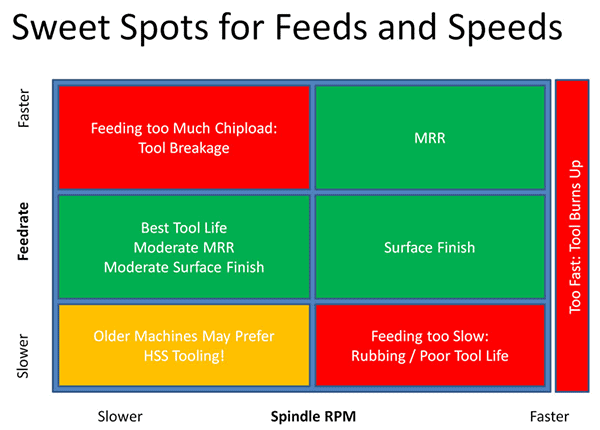
Once you know where the Sweet Spot is, you can tweak your cutting parameters within that envelope to maximize Material Removal Rates, Surface Finish, or Tool Life. In fact, you can often maximize any two of the three, just not all three at once. Let’s take a look at the sweet spots for different things, as well as the danger zones: This chart is relative, meaning you can’t assume anything about the proportions or scale. Just look at the positions of the regions relative to one another, and relative to the idea of faster and slower spindle speeds and feed rates.
Let’s consider the different labeled zones, left to right, top to bottom:
Feeding too Much Chip load As we’ve discussed, when you feed too fast for a given spindle speed (rpm), you’re likely to break the cutting tool. The more you exceed the appropriate speed, the more likely. At some point, you’ll always break the tool. Consider the absurd case where spindle speed (rpm) is zero and you rapid the tool into the work. Pop! Just broke another tool.
MRR:Running the spindle as fast as we can without burning the tool, and feeding as fast as we can without breaking the cutting tool is the sweet spot for maximum material removal rates. If you’re manufacturing, this is where you make money by getting further up and to the right than the competition.
Too Fast: Too much spindle speed will generate excess heat which softens the cutting tool and dulls it faster. There are exceptions and mitigating circumstances we’ll talk about in more advanced installments.
Best Tool Life: Slowing down the spindle a bit and feeding at slightly less than appropriate for maximum MRR gives the best tool life. We’ll talk more below about Taylor’s equations for tool life, but suffice it to say that reducing the spindle speed (rpm) is more important than reducing the feed rate, but both will help.
Surface Finish : Reducing your feed rates while keeping the spindle speed up lightens the chip load and leads to a nicer surface finish. There are limits, the biggest of which is that you’ll eventually lighten the feed rate too much, your cutting tools will start to rub, and tool life will go way down due to the excess heat generated by the rubbing.
Older Machines: So your spindle speed has come way down, and in addition, so has your feed rate. You’re probably on an older cnc machine where you can’t run the kind of speeds you need to take advantage of carbide tooling. You may need to switch to HSS.
It comes as a surprise to many that there are areas of the feeds and speeds envelope where HSS can outperform carbide, but it’s true, depending on your cnc machine’s capabilities and the material you’re cutting. Check the article “Is Carbide Always Faster than HSS” for more information.
Feeding Too Slow: What happens if feed rate is too low? As discussed, feeding too slow leads to rubbing instead of cutting, which can radically shorten your tool life and is to be avoided. Poor tool life with too slow feed rates is caused by rubbing and potential work hardening if the material is susceptible to it.
Now that you know how the sweet spots break down, you’ll have a better idea how to steer your feeds and speeds to the desired results.
I always find it’s easier to remember concepts with a visual, so hopefully the Sweet Spot diagram will make it easier for you too. Go ahead and print it out and tape it up somewhere prominent in your shop if it helps further.
Want to experiment with these concepts with no risk to cutters or CNC machine?
The fastest way to learn how things work is by going hands-on. Do that from the comfort of your armchair with a free trial of our G-Wizard Feeds and Speeds Calculator. It works for CNC Mills, Routers, and Lathes. Working through the examples in this Guide using G-Wizard will help you become proficient quickly. And guess what? It has a wonderful feature that I call The Ultimate Feeds and Speeds Cheat Sheet. The Cheat Sheet pops open right in G-Wizard, and it helps you understand exactly how to change the various parameters to create whatever end result you desire. It looks something like this:
So, for example, there are 8 suggestions for how to create shorter cycle times. And they’re in the order of highest to lowest impact, so you know what to try first. Talk about making it easy to get seriously in control of your feeds and speeds!
Improve My Feeds and Speeds For
Chapter 3:
Understand Surface Speed and Chip load to dial in your Sweet Spot
Surface Speed: How Fast the Tool Slides Against the Workpiece While Cutting
When specifying the specifications of a cutting tool, surface speed goes hand in hand with chip load. Just as chip load is a better way to talk about cnc feed rate because it is independent of so many factors, surface speed is a better way to talk about spindle rpm. Imagine that instead of a rotating cylinder with cutting edges, your cutting tool was a flat piece of metal slid against the workpiece. The recommended speed to slide when cutting is the surface speed.
Here’s the visual:
Visualizing Surface Speed…
Surface speed is measured in linear units per minute: feet per minute (SFM) for Imperial, and meters per minute in Metric.
The faster the Surface Speed, the more heat that’s generated. So, the optimum is about matching the amount of heat generated by a specific cutting tool and material to the requirements of the cutting tool. Carbide will withstand a lot more heat than HSS tooling, so it runs at higher surface speeds.
You can’t really cheat on Surface Speed. It is what it is and exceeding the manufacturer’s recommendations is sure to reduce tool life fairly drastically except for some very special HSM (High Speed Machining) cases you should only worry about when you’ve mastered the basics. Running too fast overheats the cutting tool, gets it too hot, which softens the cutting tool, which makes it dull and wear out quickly.
To give you an idea, here is a cutting speed chart (surface feet per minute chart) that shows you the surface speed in feet per minute for typical materials when cutting with an HSS (High Speed Steel) End Mill:
Cutting Speed Chart giving Surface Speeds for HSS End Mills in SFM
Consider this table which shows tool diameter versus surface speed at 10,000 rpm:
Surface Speed vs Diameter at 10,000 rpm…
If we keep rpms constant, Surface Speed is directly proportional to diameter. The 1/16″ endmill at the bottom is travelling 1/8 as fast in terms of Surface Speed as the 1/2″ endmill at top. Hence, to achieve a given Surface Speed, small tools will have to run faster spindle speed and large tool diameters will have to run slower spindle speed.
Here’s the classic surface speed or sfm formula they teach in shop classes:
There are a number of reasons why this formula is idealized and not the best for real world use, but you get the idea.
Chip Load: Chip Thickness per Tooth
While cnc feed rates are specified in length units per minute, the more important measurement is something called “Chip load”.
Think of a chip as looking something like a comma in cross section, or perhaps an apostrophe. One starts big and gets smaller at the end. The other starts small and gets bigger at the end. We’ll ignore that difference for a moment, though it is important as we shall see later.
Chip load is a measurement that is independent of spindle speed (rpm), feed rate, or number of flutes that tells how hard the cutting tool is working. That’s a very useful thing, as you could imagine. Hence, manufacturers and machinists typically like to talk about chip load for a particular cutting tool.
You can see that a cutting tool with more flutes (cutting edges) has to be fed faster to maintain a particular chip load. Since each cutting edge is going to take a cut every rotation, a cutting edge has only a fraction of a rotation in which to cut a chip that reaches the chip load thickness. During the time it takes to rotate the next cutting edge to start cutting, the tool has to have moved far enough to shave off a chip that is thick enough. Hence, tools with more flutes can be fed faster.
A 4 flute endmill can be fed twice as fast as a 2 flute, all other things being equal.
Something to know–aluminum is typically limited to 2 or 3 flutes on an endmill. Why? Because chiploads are high (it’s an easy material to cut) so the chips are thick and they curl. They will jam the flutes if they’re too small. By limiting flutes to 2 or 3, the flutes can have more clearance for the big chips.
Why do Cutting Tools Break from Too Much Chip Load?
You can imagine that forces simply become too great if a cutting tool tries to take too much “bite” by having too much workload. This can chip or break the cutter.
But there is a second issue that comes from too much chip load–the chips get bigger and eventually can’t get out of the cutter’s way.
Beginning machinists probably break more cutting tools because they don’t get the chips out of the way fast enough than because the force of the feed is breaking the cutting tool.
If the cutter is down in a deep slot, the chips have a particularly hard time getting out of the way. We use air blasts, mists, and flood coolant to try to clear the chips out of the way, but if they’re way down a hole or slot, it makes it that much harder, and we have to reduce speed. Making matters worse, chips always take more room once they’re chips than the equivalent weight of material takes as a solid. The only place they have to go is gaps between the flutes of the cutter. Of course, the more flutes we have, the less space there is in the gaps.
Can you see the point of diminishing returns coming?
Performance Recipe: Cheating on the 2 Flute Rule for Aluminum and Going to More Flutes Elsewhere
Many beginners are taught to use a 2 flute in aluminum for chip clearance, but must we always use 2 (or perhaps 3 flutes) for Aluminum and never 4?
Now that we know why fewer flutes must be used (chip clearance), we can think effectively about when we might not be restricted to fewer flutes. In general, when you have plenty of room for the chips to escape, you can use a 4 flute cutter, and you’ll get a better surface finish.
How much is “plenty” of chip clearance?
Forget slots and plunging. Those are the worst cases and you must keep to 2 or 3 flutes there.
Try to avoid tight inside corners or interpolated holes whose diameter is at all close to the tool diameter, those are nearly as tough.
But what if we are profiling around the outside of a part and there’s no concave curves, only convex?
Tons of chip clearance there, so have at it. If you have a sufficiently roomy pocket, you may also get away with a 4 flute, especially if you can open up a big hole in the middle of the pocket to get started in.
The best case for more flutes is when you have a finishing pass, particularly if you’re already committed to changing cutting tools to get the best possible surface finish from a newer sharper cutting tool that hasn’t been roughing. The finishing pass will be very shallow and the rougher will have opened up plenty of room for chip clearance. Consider using 2 or 3 flutes for roughing followed by 4 flutes for finishing in materials like aluminum. BTW, if you know you’ll be using two different cutters for roughing vs finishing, consider using a dedicated roughing end mill for improved material removal rates.
In harder materials that don’t need so much chip clearance, cutting tools with as many as 10 flutes may be used. This doesn’t just apply to aluminum either.More exotic cutting tools are available with 5, 6, 10 or more flutes.
Experienced hands will tell you that if you’re profiling (where there’s lots of chip clearance) steel and aren’t using 5 or 6 flutes, you’re leaving money on the table.
Let’s run the numbers in G-Wizard. Suppose we’re profiling some mild steel–1020 or some such. We’re going to profile the outside of a part, so there’s plenty of clearance. Cut depth will be 1/2″, cut width 0.100″, and we’ll use a 1/2″ TiAlN Endmill. Here are the numbers:
– 4 Flute: 3158 rpm, 29.8 IPM. MRR is 1.492 cubic inches/minute. A little over 1 HP.
– 5 Flute: Same rpms, now 37.3 IPM. MRR = 1.865. 1.3 HP. That’s 30% faster cutting.
– 6 Flute: Now 44.8 IPM. MRR = 2.238. 1.6 HP. 60% faster than the 4 flute case.
How much more profitable are your jobs if you could run them 60% faster? The cost to do so is a more expensive endmill and a tool change for profiling. Harder materials can benefit particularly well because they’re already up against surface speed limits. More flutes is the only way to get faster feeds.
Sometimes we have to go the other way too. If you’ve got some really sticky stainless steel that’s giving you fits in tight chip clearances, try a 3 flute instead of a 4.
Improve My Feeds and Speeds For
Chapter 4:
Avoid Rubbing and Chip Thinning to improve Tool Life
Rubbing: When You’re Feeding too Slowly
Most newcomers to milling are shocked to learn they can ruin an end mill quickly by feeding it too slowly. I’ve mentioned several times now that feeding too slowly causes “rubbing” which is what destroys the tool. How does that work? Consider a magnified view of your cutting edge versus the material:
Two chip loads: Top one has chip thickness > tool edge radius. Bottom one has chip thickness < tool edge radius and will rub…
In the diagram, the cutter edge radius centerline travels along the yellow lines. If the radius is too large relative to the depth of cut (bottom), all the force goes to pushing the chip under the edge. This is the “rubbing” effect you’ll hear talked about when feed rate and hence chip load are too low. Tool manufacturers will tell you that too little feed is just as bad for tool life as too much feed (or too much spindle speed / rpm). But how little is too little? That part is seemingly hard to find out. I went fishing around with Google to try to find what speeds and feeds result in a “burnishing” effect with tools. Here is what I found:
– Article on hard milling: 0.0008″ per tooth is definitely burnishing because it is “less than the edge hone typically applied to the insert.”
– De-Classified 1961 Batelle Institute report on aerospace machining of super-alloys says an IPR less than 0.0035 will result in burnishing and likely work hardening of these alloys. Interesting how well this number agrees with the one above for a 4 flute cutter. 8 tenths times four would be 32 tenths.
– Another reference, like the first, to keeping chip loads higher than tool edge radius. In this case, IPT should be greater than 0.001″. This is once again an article on hard machining where work hardening may be a factor.
– Ingersoll says that as a general rule carbide chip loads should not be less than 0.004″ or you run the risk of rubbing which reduces tool life and causes chatter. Chatter is machining vibrations that cause terrible surface finish and can wear out a tool very quickly.
– Chip Formation and Minimum Chip Thickness in Micromilling uses a figure of 20 micrometers for edge radius on micromills, which is about 0.00079″. They go on to show that the rake angle becomes extremely negative as the chip load falls below the edge radius and conclude that there is a minimum chip load below which the cutter will not cut. It varies from about 0.2 to 0.35 times the radius for various kinds of steel.
1. If you cut too little, you run the risk of work hardening if your material is susceptible to it (like Stainless steel). That will wreck your tool life if you are over-stimulating work hardening. Imagine tossing a handful of hardened chips into the path of our cutter–that can’t be good!
2. Aside from work hardening, if you’re cutting much less than the cutting edge radius, you’re rubbing and not making clean chips. That will heat the tool and material and drastically reduce tool life.
Figuring out the work hardening part is easy. If your material is susceptible, keep the chip load up at the tool manufacturer’s recommendations and don’t fool around. Figuring out the whole cutting radius issue is harder. Most of the time we don’t know what the cutting radius is. I’m not talking about tip radius on a lathe tool, for example. I’m talking about the actual radius of the sharp edge. In other words, the smaller the radius, the sharper the tool.
A lot of carbide inserts are pretty blunt. A chip load of less than 0.001″ may very well be too little. Modern tools for aluminum are often much sharper, and can take less chip load. In general, indexable tools are usually less sharp than endmills, so they need higher chip loads. It’s ironic that just when you think you are taking it easy on a cutter with a very light cut, you may be doing the most damage of all due to rubbing. Why chance it though?
Use a calculator like G-Wizard to figure out how to deliver the manufacturer’s recommended chip load by increasing the cnc feed rates. Not only will the job go faster but your tooling will last longer. In cases where you need to reduce the chip load to improve surface finish, G-Wizard also includes a built-in rubbing warning to keep you out of trouble. Here’s a video I made for Cutting Tool Engineering magazine on the whole topic of rubbing:
Radial Chip Thinning (aka I’m an Expert and I ran the Machine too slowly without even knowing it)
Would you believe that especially for light cuts, the basic math combined with SFM and chip load tables often gives results that are wrong and radically increase the wear on your tools?
The reason is that there is more going on here than meets the eye. For example, if I poke around various tool manufacturer’s literature in search of speeds and feeds for steel, I can get to a page like this one from Niagara cutter. First thing to note is that the recommended chip loads and SFM vary depending on the exact operation being performed, and in particular, the depths of cuts. If you’re just using the basic shop math around SFM and chip load, no such compensation is available.
I have built compensation like this into my G-Wizard Machinist’s Calculator, but trust me, it isn’t so easy just to do it by hand. You’ll be constantly referring to pages and tables, or to Excel spreadsheets.
Let’s try an example based on doing a cutting operation of peripheral (edge) milling to profile a part made out of mild steel using a 1/2″ uncoated HSS 4 flute endmill. We plan to take fairly shallow finishing quality cuts of 5% of the cutter diameter. Further, let’s do a pretty deep cut axially, a full cutter diameter of 1/2″. So if I am profiling a 1″ high part, I can make a full pass by going around twice and cutting 1/2″ each time.
What feeds and speeds should we use?
Tool Manufacturer Niagara says for cuts less than 1/16 of a diameter (5% is 1/20), we want 210 SFM and a chip load of 0.0035 for an end mill. If I plug all that into G-Wizard, but ignore the chip thinning, I get the following results:
Radial Depth Ratio of 5% = 0.015″ depth of cut 210 SFM and 0.0035 chip load gives us 22.46 IPM feed rate and a 1600 rpm spindle speed.
Is that the right speeds and feeds?
Yes and no. It’s certainly what the majority of folks would use. In fact, they might even be less aggressive than that if they’re trying to be conservative.
Let’s see what G-Wizard would suggest by default and why: For the same depth of cut and cutter, G-Wizard wants a little slower SFM of 160, and a little less aggressive chip load at 0.003. The spindle speed works out to be 1200 rpm spindle speed due to the lower SFM, but the feed rate is now 84.69 IPM–nearly 4x the original values.
How can we go so fast?!??
Unfortunately, avoiding the rubbing problem gets harder, even for experts, because of a phenomenon known as “Radial Chip Thinning.” With chip thinning, you can be making a cut and following all the recommended chip loads, and still be rubbing. The cut above, 1600 rpm spindle speed spat 22.46 IPM will almost certainly wind up rubbing. The reason is that due to the geometry, when your radial engagement, the cut width looking down the axis of the tool, is less than half the diameter, the chips that come off are actually thinner than the basic formulas everyone learns in machinist’s school predict. A picture is worth a thousand words when understanding why:
The blue chip is a shallower cut. Note how thin it is at its widest compared to the red chip from a deeper cut…
The blue chip represents a very shallow cut, and the red chip a deeper cut.
Note how thin the blue chip is at its widest compared to the red chip from a deeper cut. You can see that the chip gets thicker all the way up to the point where we’ve buried the cutter to 1/2 its diameter. That’s the thickest point.
Chip thinning simply answers the question, “How much faster do we have to go so the maximum width of the blue chip is the recommended chip load?”
Because we’re just trying to get back to the recommended chip load, chip thinning isn’t about going faster in the sense of higher MRR’s. You will see your machine going faster, sometimes a LOT faster, but chip thinning is about avoiding rubbing that will dramatically shorten your tool life. Many manufacturers publish tables that suggest how much faster to feed based on the % of cutter diameter you are cutting. A good machinist’s calculator, like G-Wizard, will factor in chip thinning automatically. Unless you never cut less than 1/2 the diameter of your tool, you need to make sure you’re adjusting your cuts for chip thinning or you’re probably wearing out tools prematurely as well as not taking full advantage of the material removal rates the tool is capable of. Here’s a video from my “CNC Chef” column over on CTEMag that goes over Chip Thinning:
There are phenomena similar to radial chip thinning that can radically influence the performance, feeds, and speeds of specific cutters based on their geometry. One such has to do with lead angle and face mills.
Join 100,000+ CNC'ers! Get our latest blog posts delivered straight to your email inbox once a week for free. Plus, we’ll give you access to some great CNC reference materials including:
Bob is responsible for the development and implementation of the popular G-Wizard CNC Software. Bob is also the founder of CNCCookbook, the largest CNC-related blog on the Internet.



 Check out just a few of the thousands of world-class manufacturers that are using G-Wizard today:


 They know what they’re doing and wouldn’t waste time or money if the software didn’t work. Here’s the free calculator, and you can grab it now:
 How do you lose with that deal? It takes just 37 seconds to download and start using G-Wizard. It costs you nothing and you can get great feeds and speeds from it for the next 30 days. If you want to go back to our free online calculator after that, no worries. But you may as well drive the high performance model as long as it’s free, right? G-Wizard Features for Each Machine Type Still not convinced? Consider that G-Wizard has specific features for each machine type. In effect, you get 3 Calculators in one:


 This chart is relative, meaning you can’t assume anything about the proportions or scale. Just look at the positions of the regions relative to one another, and relative to the idea of faster and slower spindle speeds and feed rates.


